
How Do Videos Perform on LinkedIn? I Posted 58 to Find Out
Between January 1 and July 10, 2025, Oluwaseun posted 58 videos on LinkedIn, ranging from 3 seconds to 7 minutes. In this article, he discusses the result and what that means for your content strategy.
This might be the most brain-bending chart I’ve seen in 2025:
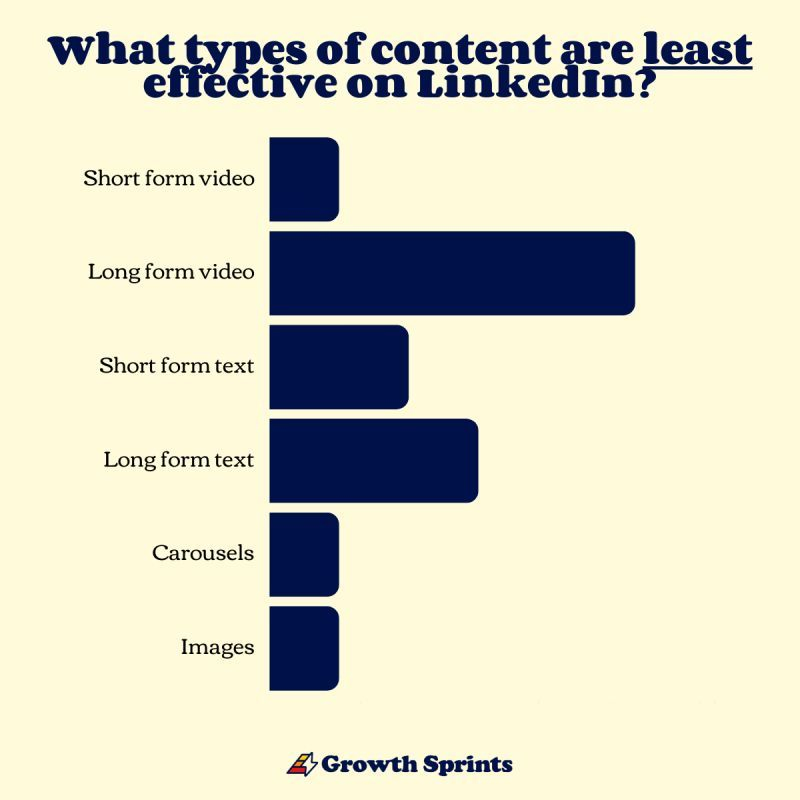
Source: Brendan Hufford
In an interview with B2B marketers, Brendan found that long-form videos are the least effective content format on LinkedIn (40%), and short-form videos are the most effective at 7%.
Wait, how can 7% (the lesser number) be positive?

And what does “effective” even mean here? Are we talking about impressions? Engagement? Watch time?
Turns out, it’s all three.
To satisfy my curiosity, I ran a mini-study: I posted 58 videos of varying lengths over 6 months and tracked the data using Sheets.

A snapshot of what I discovered:
- Shorter videos = Higher completion rates
- High impressions ≠ High engagement
- Top engagement came from short, punchy clips
And that’s just scratching the surface. The full breakdown lies ahead.
A quick note: I started this experiment with 583 followers and ended it with 1,721, all on a personal account. You should definitely try something similar. But… maybe don’t use Google Sheets. It took me hours to pull the metrics from several tabs. Use Measure Studio to save yourself the stress with automated analytics.
Should you post videos on LinkedIn?
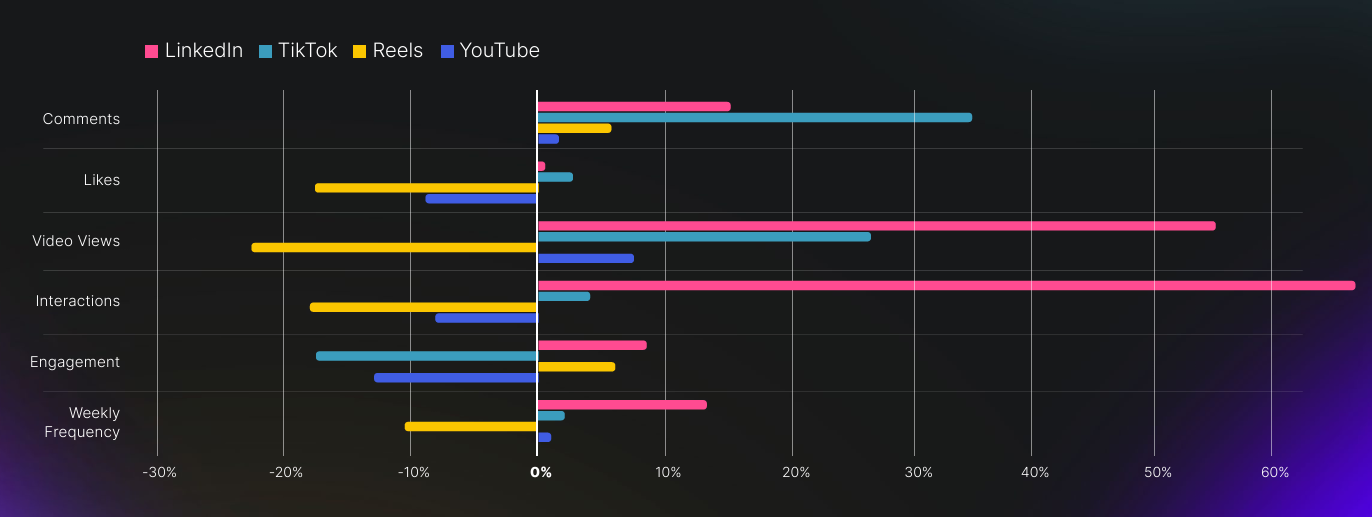
Metricool’s 2025 LinkedIn study revealed two key insights:
- Video content has grown 53% on LinkedIn since 2024
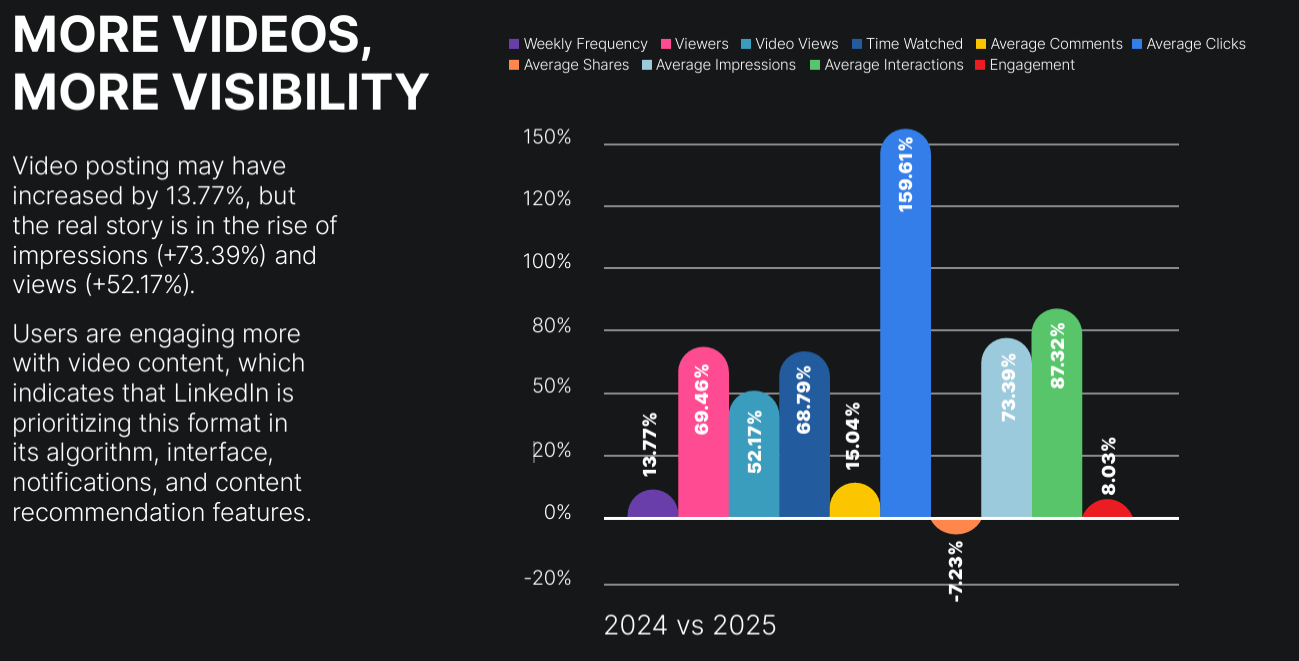
- LinkedIn videos outperform platforms like TikTok in views, engagement, and posting frequency
Love TikTok? You’ll love this: Which Types of TikTok Posts Should Brands Know in 2025?
Still, those stats alone don’t answer the real question: How do videos stack up against other formats on LinkedIn?
Measure Studio’s research on content shelf life on LinkedIn offers a deeper layer.
Images, texts, or videos?
Measure Studio found that:
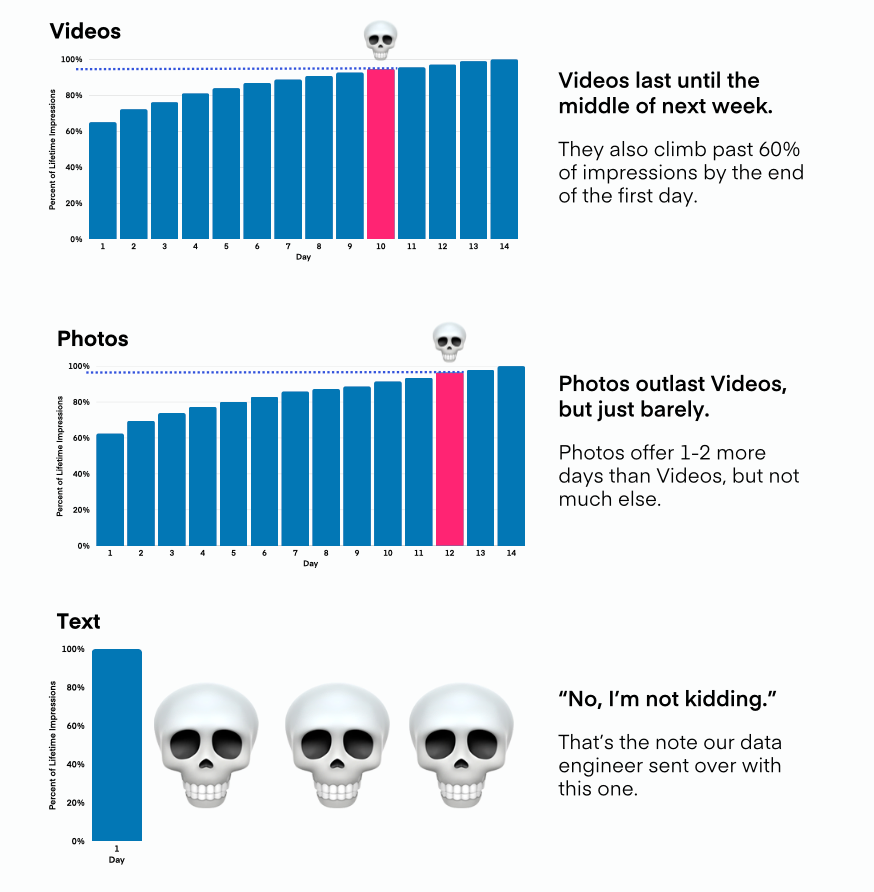
- Videos and images outlast text posts on LinkedIn
- Images slightly edge out videos in total lifespan
And I can totally relate… Measure Studio’s findings align with what I saw in my data from H1 2025.
My top-performing posts by impressions:
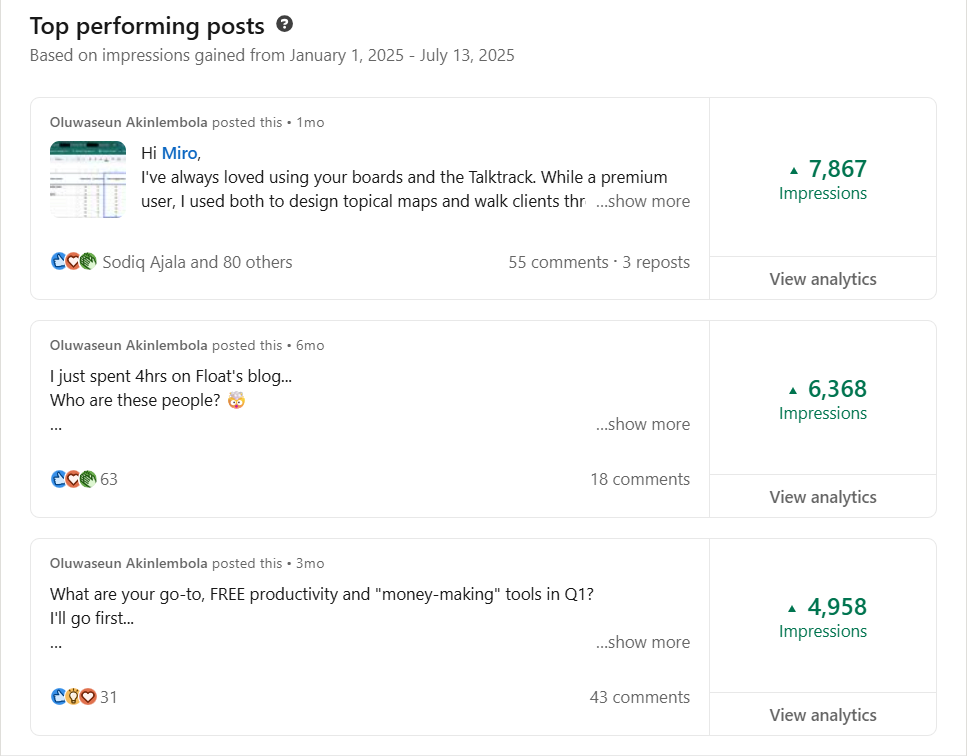
No. 1 spot was an image, while none of the top 3 were videos. But for engagement, I got a different story.
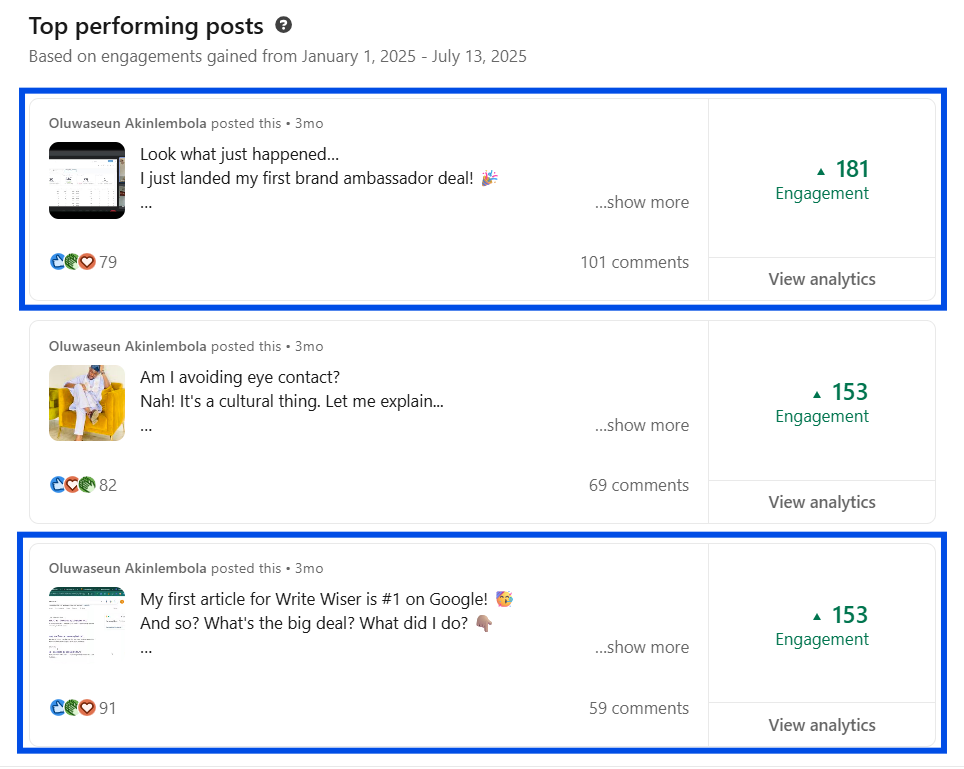
2 of the top-3-engaged posts were videos.
So, back to the original question. Should you post videos on LinkedIn?
Yes, but not because of the hype. Post videos because they’re the best format for engagement.
That brings us to the next question… which video length is the most effective?
Also read: 10 best LinkedIn metrics that matter for building a strong community
I posted 58 videos; here’s what I found.
I uploaded my spreadsheet into ChatGPT and asked it to create a scatter plot, line graph, and bar chart.
Below are my findings.
| Insight | What it means |
|---|---|
| Shorter videos = higher completion rates | Aim for 20–60s videos |
| High reach ≠ high engagement | Prioritize quality engagement |
| Best engagement = short + punchy | Study and repurpose your top performers |
1. Shorter videos dominate completion rates
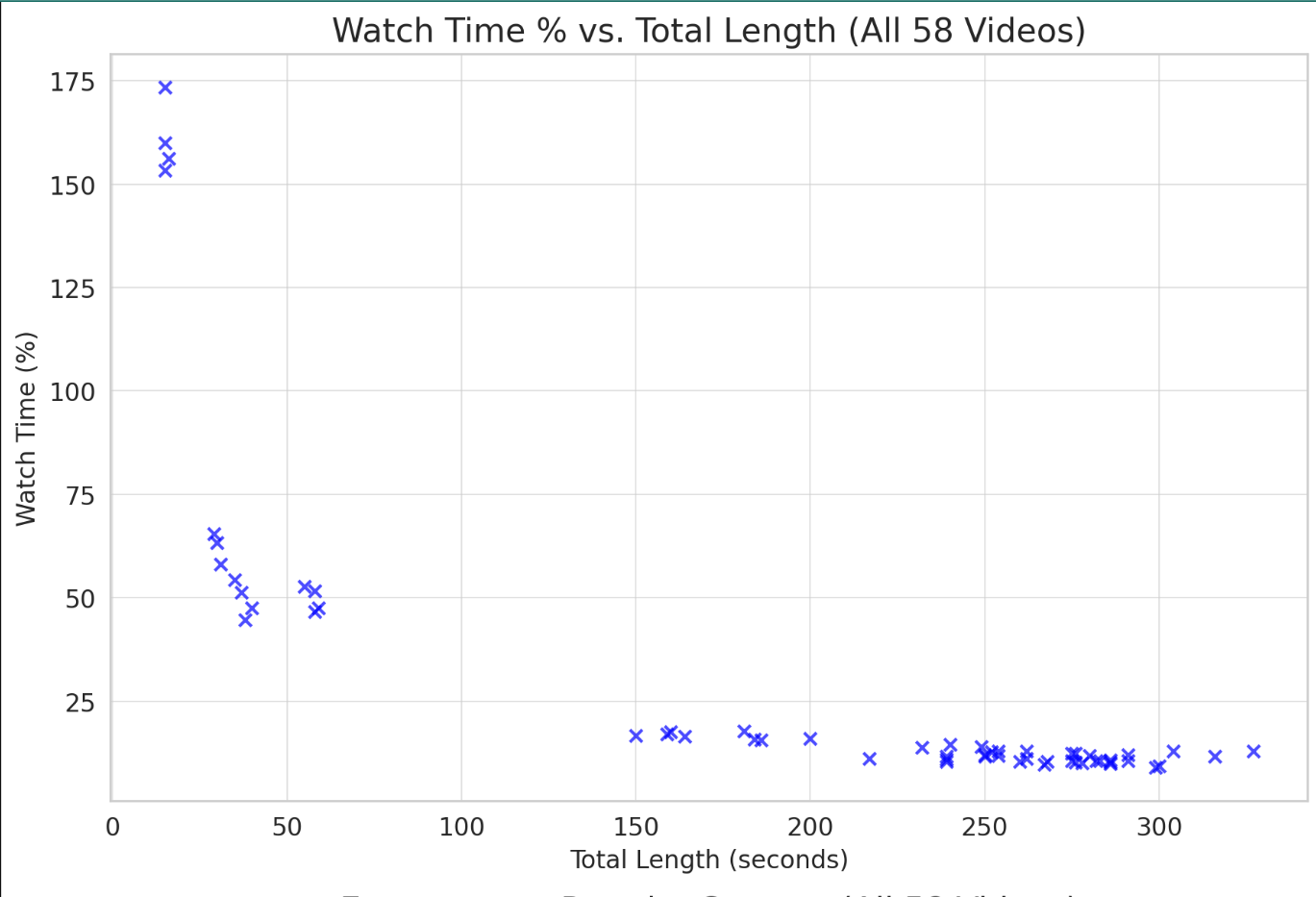
The scatter plot shows it clearly:
- Videos under ~60 seconds consistently earn higher watch-time percentages.
- Videos over 3 minutes often drop below 25% watch time.
What does that mean for your strategy?
Keep your videos between 20 - 60 seconds for max retention. This is perfect for teasers—like the types Tim Soulo (CMO, Ahrefs) does for Ahrefs Podcast.
2. High impressions ≠ High engagement
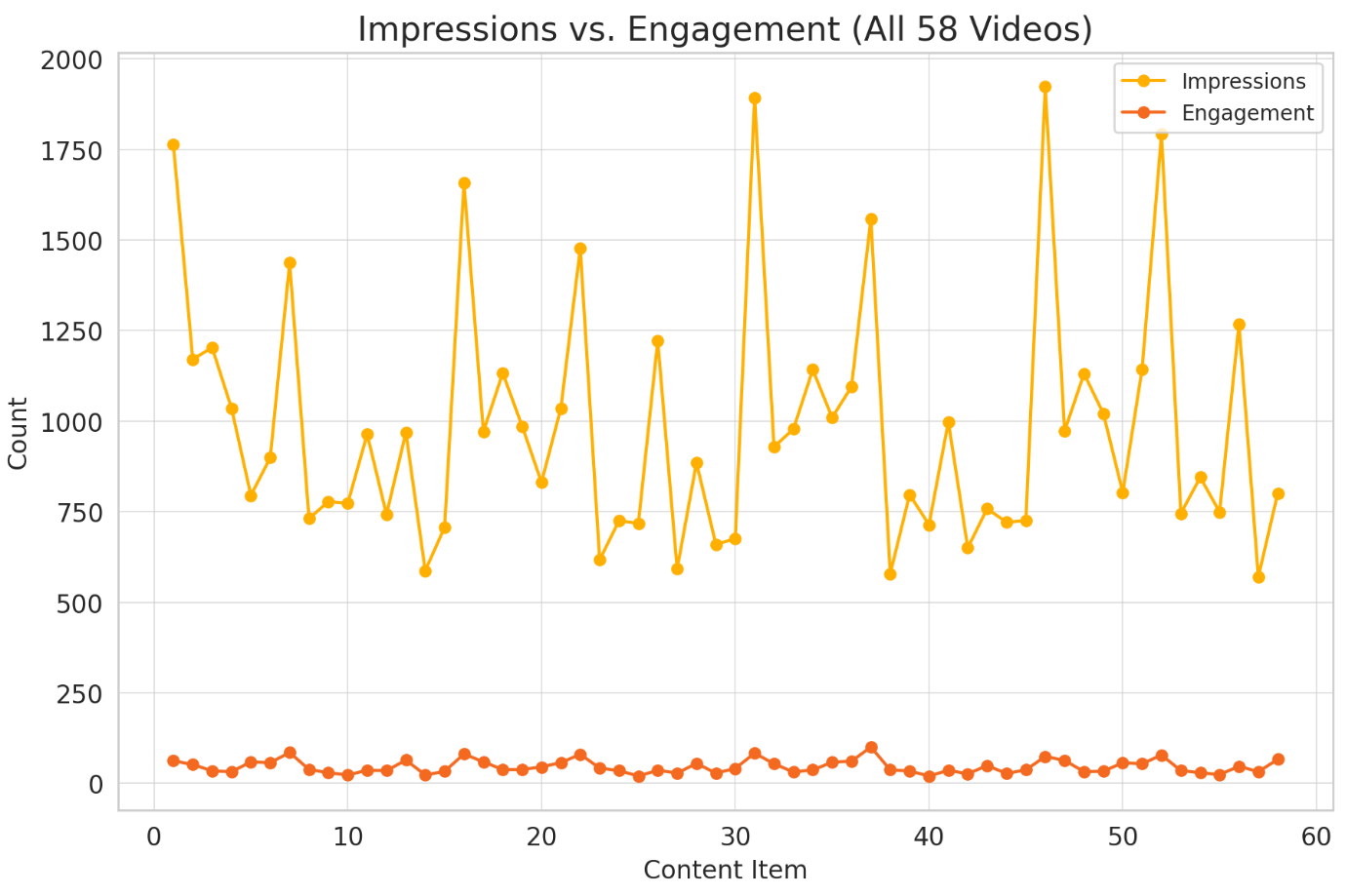
The line graph indicates that some videos with mid-level reach outperformed viral ones on engagement.
What does that mean for your strategy?
Don’t chase impressions alone. Hook people early with relevance. In other words, prioritize engagement, especially now while LinkedIn timelines are showing posts from 2–3 weeks ago.
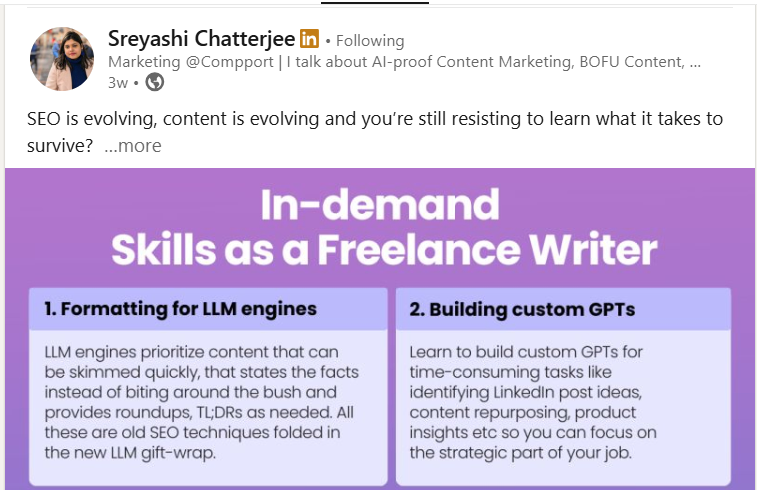
Source: Sreyashi C.
3. Top engagement clusters around short + punchy content
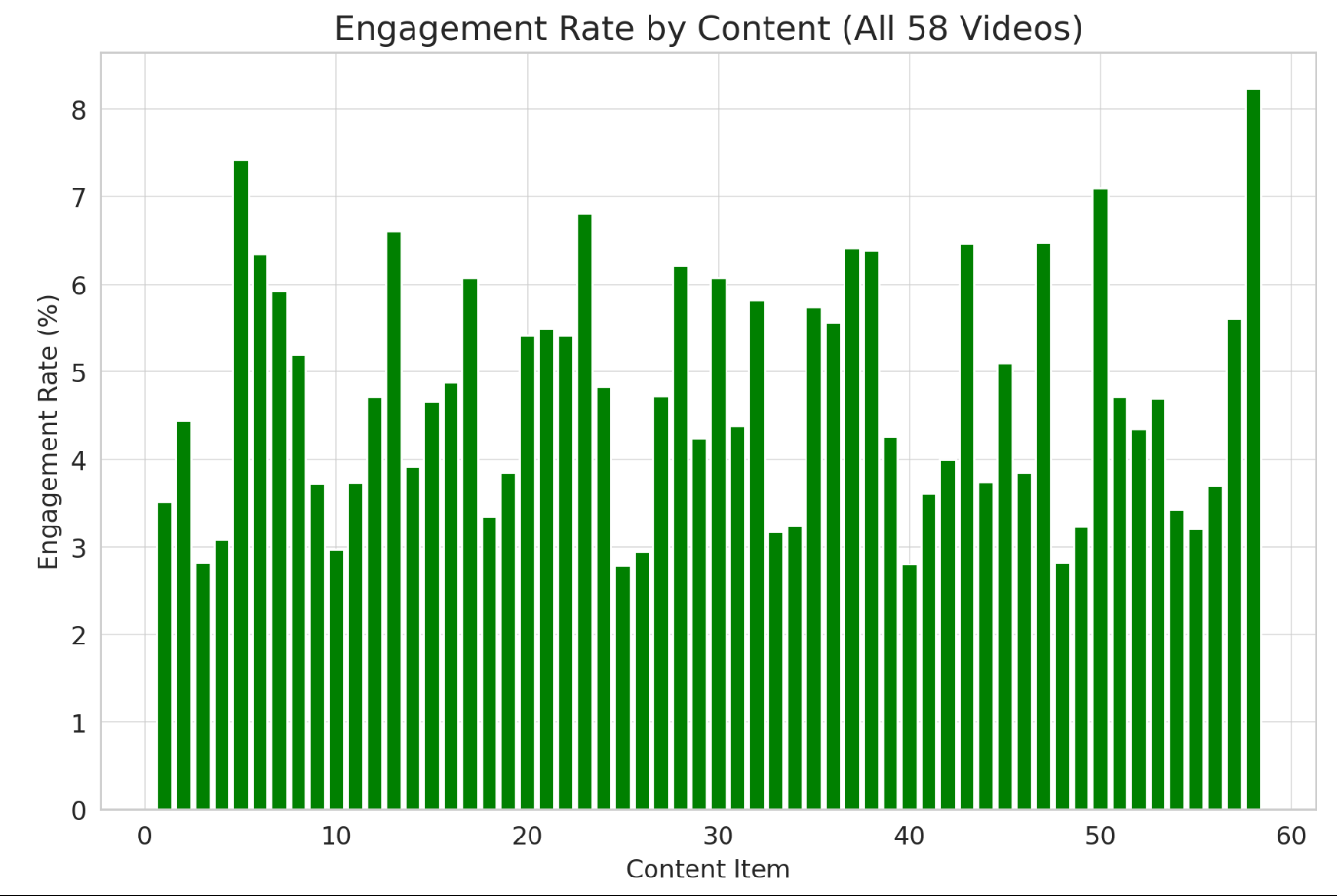
The bar chart highlights videos with 5–8% engagement rates, and they are often under 1.5 minutes.
What does that mean for your strategy?
Identify your top-performing posts, analyze why they worked, and repurpose them. Even better, use them as models for new content.
Verdict: How long should your video be?
Let’s use this bubble chart to answer:
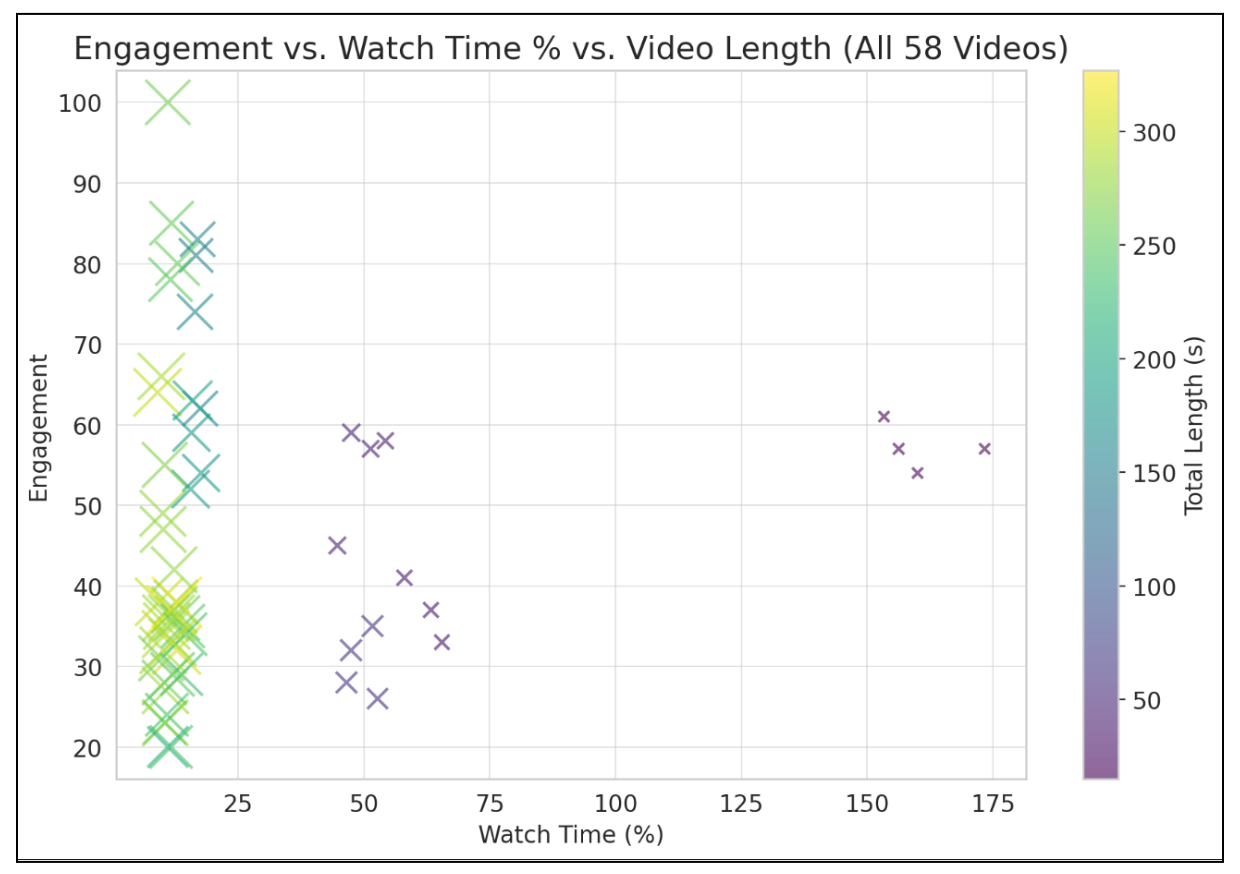
- Small-to-medium bubbles in the top-left corner are gold: high engagement, high watch %, and digestible size.
- Larger bubbles (long videos) rarely float unless the content is sticky.
In short, the ideal zone for video effectiveness is mid-length. These types have high watch rates and engagement.
What does that mean for your strategy?
Aim for ~45s–1min:30s long videos with strong storytelling or punchy structure.
Are ~45s–1min:30s long videos the most effective content format on LinkedIn? For my dataset, yes. But for you, that might not be the case. I recommend doing your analysis with Measure Studio to find out.
How to find your ideal video length with Measure Studio
When working with large datasets, especially for pages, spreadsheets can quickly become overwhelming. Measure Studio saves time and lets you avoid manual tracking with custom social media analytics.
Follow these steps to uncover which video lengths get the best engagement from your audience:
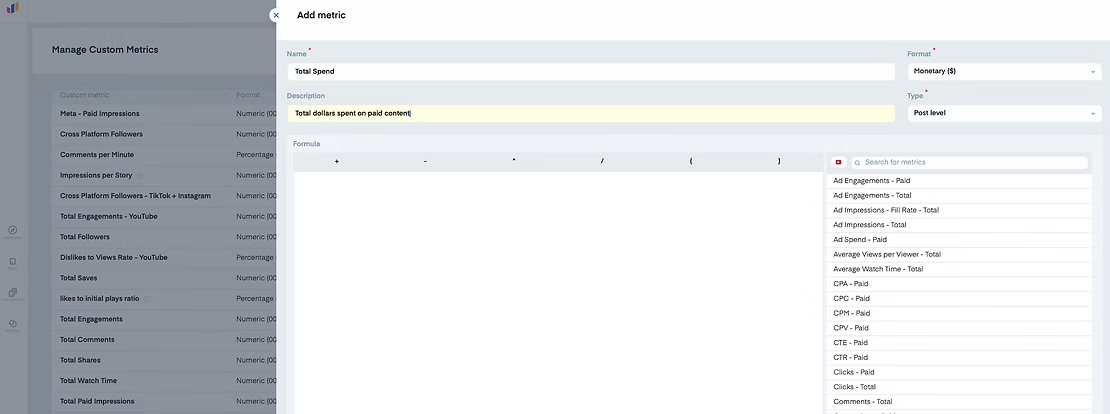
Step 1: Create a custom metric
Go to “Manage Custom Metrics,” click Add Metric, and define a formula, e.g.:
Engagements ÷ Video Length to compare performance across durations.
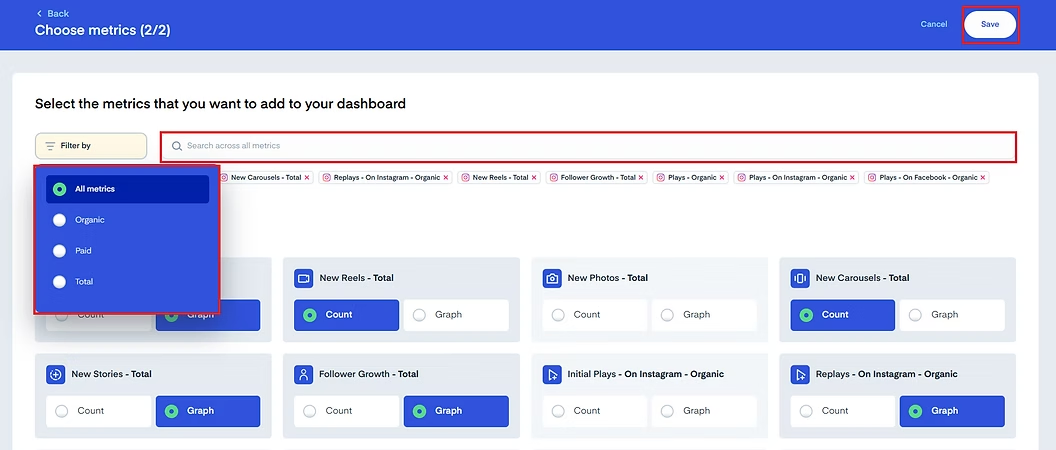
Step 2: Build a LinkedIn dashboard
Create a new social media dashboard, add a Chart widget, and select relevant LinkedIn metrics (views, engagement, and watch time) alongside your custom metric.
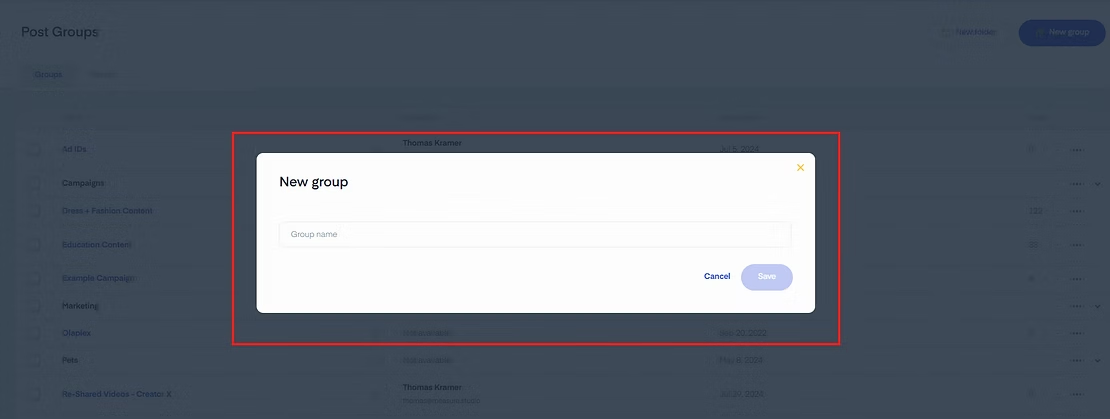
Step 3: Group and analyze posts
Use Post Groups to segment videos by length (e.g., 0–30s, 30–60s, 60–90s). Then compare engagement and watch % across groups.
By now, you should have your personalized sweet spot—the duration range that resonates most.
Try Measure Studio for free and see which videos are most effective for your brand on LinkedIn.
Get started with Measure Studio today.
Author Bio

Oluwaseun Akinlembola is a freelance content marketer & creator for B2B brands/agencies in the marketing and productivity space. See what he’s up to on LinkedIn.
Frequently Asked Questions
Should I add captions to my LinkedIn videos?
Yes. Captions improve accessibility and retention, especially for people who scroll LinkedIn on mute. They also help clarify your message and boost watch time.
Does video quality affect my LinkedIn performance?
No study on that yet. However, clear visuals and audio can build trust and reduce drop-off. FYI, you don’t have to wait until perfection to start. Instead, be authentic and record well-lit content.
Can I repost the same video more than once?
Yes, but change the caption or thumbnail to avoid fatigue. Reposting top-performing videos can extend their reach. Plus, it’s a way to share the post with new followers/connections.