
Marketing Tools You Should Know in 2025
Marketing tools for social media managers and content teams that actually work - curated from real user feedback to save time and prove ROI.

Every marketer knows the feeling when you bookmark another “Top 50 marketing tools” list, skim through a few names, and close the tab because it’s all too much.
We’ve done it too.
In fact, before writing this, we first flooded our feeds, joined communities, and asked founders and marketers point-blank what they’re actually using day-to-day.
Because let’s stop pretending another generic “Top 100 tools” roundup is actually helping anyone. Nobody wants to wade through fluff descriptions that read like thinly veiled sales pitches.
What we actually need to know is simple:
→ Does this tool solve a real problem?
→ Will it save me time I can’t afford to lose?
→ Can I show my boss it’s worth the investment?
That’s why this roundup is different.
We didn’t just grab product descriptions and call it a day. Every tool here earned its spot because either a founder was genuinely excited to show us what they built, or a marketer’s eyes lit up when explaining why it actually works.
For social media managers, content leads, and digital teams already stretched thin, here’s a curated stack that’s worth both your time and budget.
Starting with a quick overview table so you can scan the essentials at a glance:
| Tool Name | What It Does | Who It’s For | Free or Paid | Standout Feature |
|---|---|---|---|---|
| Measure Studio | Social media analytics platform that consolidates data from multiple platforms and provides AI-powered insights and automated reporting | Agencies and marketing teams managing multiple social accounts | Paid plans available; free trial available | Customizable dashboards with AI insights and cross-platform comparison |
| Demand Genius | AI-powered content audit tool that helps marketers find gaps and opportunities in their content library. | B2B marketers and content teams | No pricing details found on a verified official site. | Custom AI prompts to evaluate content across multiple lenses |
| Octolens | AI-powered monitoring tool that surfaces high-signal brand mentions | B2B SaaS marketing and growth teams | Paid plans start at $69/month, $99/month, etc. Free trial available. | Smart AI filtering that highlights important conversations |
| Supergrow | AI LinkedIn branding tool that creates authentic posts and manages engagement | Professionals, creators, and small teams | Paid plan starts at $19/month for Individuals, with a 7-day free trial. | Custom AI writing based on your past posts |
| Statusbrew | Social media management with scheduling, engagement, and reporting | Agencies and multi-brand marketing teams | Paid plan starts at $69/month for Lite. 14-day free trial available. | Unified inbox with AI moderation and workflows |
| Smart Templates for Jira | Converts Jira into a marketing-friendly platform with reusable campaign workflows | Marketing teams, SMBs, enterprises | Paid, but offers a free trial; pricing by user count | Reusable templates with checklist integration |
| Mailmodo | Email marketing tool for building interactive AMP-powered campaigns | Marketers and businesses focused on engagement and conversions | Paid plans begin at $39/month. Users get a 21-day free trial. | Embedded forms, surveys, and carts inside emails |
| Mobile Text Alerts | SMS marketing platform for sending, automating, and tracking campaigns | Marketing and customer service teams at startups and enterprises | Paid plans from $19/month. 14-day free trial. | Powerful automation with 5000+ integrations |
| Heyou | LinkedIn engagement tool that amplifies company and team visibility authentically | Marketing, sales, customer success teams, and founders | No pricing details found on a verified official site. | AI + human blend that mimics natural engagement safely |
Well, that’s the quick snapshot.
But choosing tools isn’t just about checking boxes on a feature list, so let’s dig into what each one actually does, and more importantly, why they are worth considering.
- Measure Studio
What is it
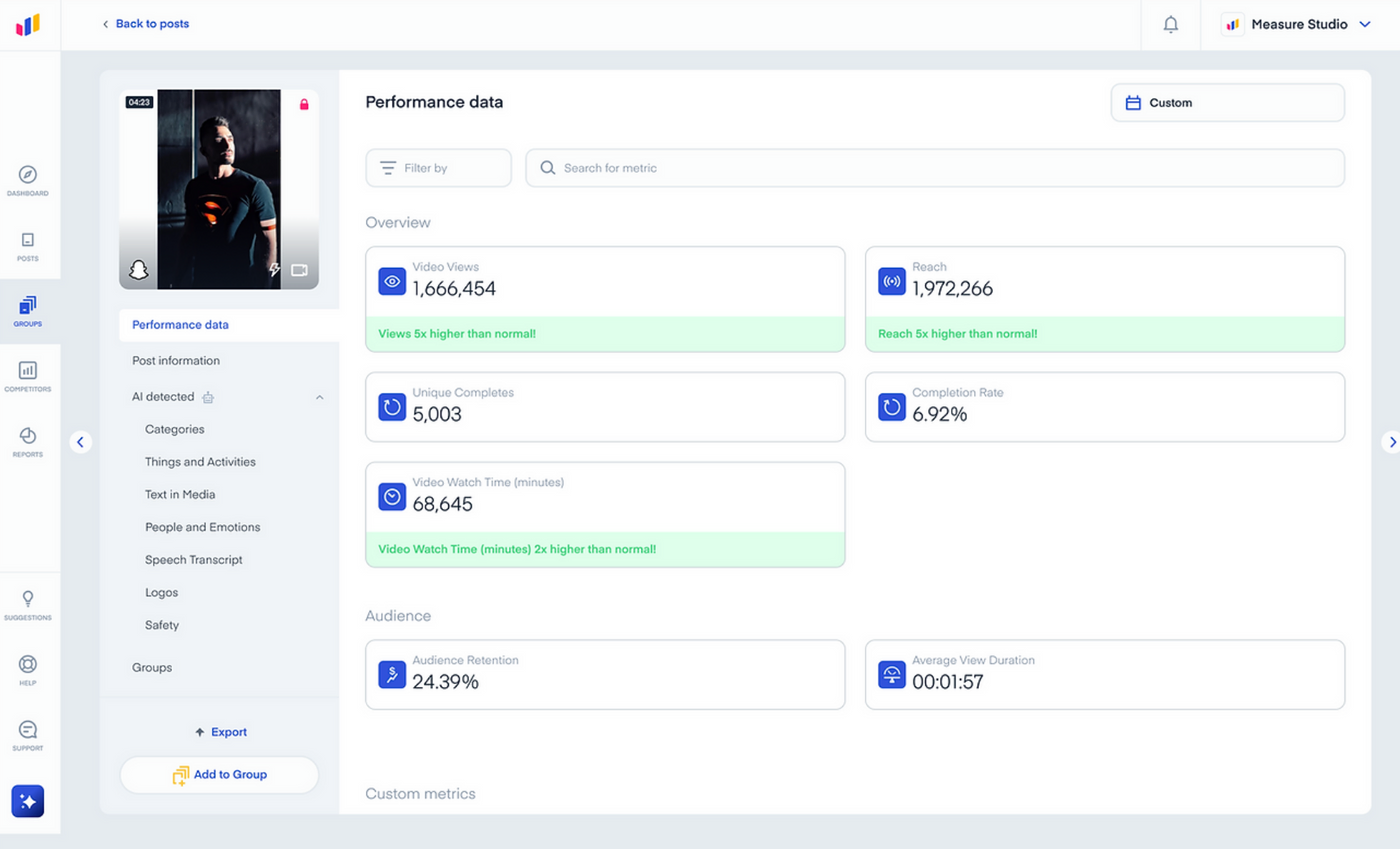
Measure Studio is a social media analytics platform designed to help marketing teams track, analyze, and optimize their performance across multiple platforms.
It consolidates data from Facebook, Instagram, TikTok, YouTube, X (Twitter), LinkedIn, and Snapchat into a single, customizable dashboard, so teams can focus on insights instead of switching between tools.
AI-powered analysis and automated reporting make it easy to see what’s working and make smarter content decisions.
How marketers benefit
Managing multiple social media accounts can be chaotic. Measure Studio simplifies the process by:
- Providing a unified dashboard to see all your accounts and campaigns in one place.
- Offering Post Content AI to predict how algorithms will view posts after publishing.
- Delivering automated benchmarking so you know if content is performing above or below your typical results.
- Generating customizable reports to save time on manual data compilation.
- Allowing post group comparison to identify trends and highlight opportunities for improvement.
- Enabling competitive tracking to monitor competitors’ social performance.
- Creating custom social media metrics to track KPIs tailored to your goals.
- Providing data drops for deeper analysis or integrations.
- Analyzing paid media campaigns alongside organic performance for a complete view.
Key features
| Feature | What It Means for Marketers |
|---|---|
| Customizable Dashboards | Build dashboards tailored to campaigns, products, or teams. |
| AI-Powered Content Analysis | Predict how your content will perform and optimize accordingly. |
| Automated Benchmarking | Quickly see how your content compares to industry standards. |
| Cross-Platform Metrics | Aggregate data from multiple platforms for a full-picture view. |
| Smart Post Grouping | Organize posts using tags and filters for easier tracking. |
| Presentation-Ready Reports | Generate polished reports for teams or clients in minutes. |
Perfect for
Agencies and marketing teams that need a centralized platform for analytics, reporting, and content optimization without the hassle of juggling multiple tools.
Read: Can Your Social Media Dashboard Predict the Lifecycle of Your Content?
- Demand Genius
What is it
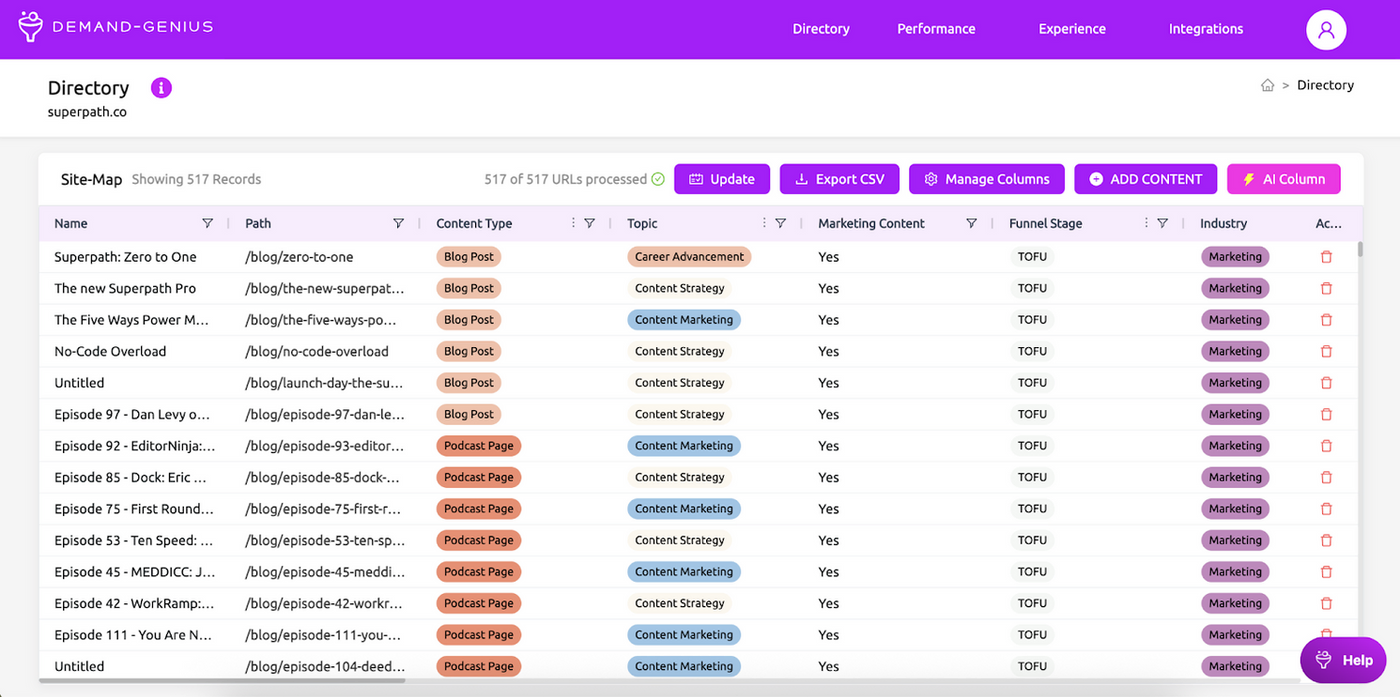
Demand Genius is an AI-powered auditing platform that helps marketing teams stop churning out content blindly and start focusing on what actually moves the needle.
Instead of manually digging through site pages or running scattered checks that take forever, it indexes your entire content library in minutes and shows you exactly where you’re winning, where gaps exist, and whether your messaging aligns with strategy.
How marketers benefit
For B2B teams constantly pressured to prove their content’s worth, this gives you clear ammunition to show leadership what’s working and what isn’t.
- You can finally stop waiting weeks for external audits and get instant insights into whether your content strategy is actually landing with your ICP.
- GTM teams can find usable content faster instead of recreating assets that already exist somewhere in your content maze.
- Most importantly, you get to connect the dots between content and revenue, something most marketing teams never get to see clearly.
Key features
| Feature | What it Means for Marketers |
|---|---|
| AI Content Library | Scans and indexes your entire site content in minutes, not hours |
| Simple Reporting | Shows content gaps and opportunities without heavy analysis work |
| Custom AI Prompts | Run specific audits for SEO, geography, brand voice, or any content angle you need |
| Persona Alignment | Map your audits directly to your ICPs and internal personas |
| AI Chat | Let GTM teams query your content library like asking a smart assistant |
| Site + CRM Integration | Track which content actually drives revenue in about 10 minutes |
Perfect for
B2B marketing teams tired of producing content in the dark who want fast, data-backed proof of what’s truly working.
- Octolens

What is it
Octolens is a monitoring platform built for B2B SaaS teams who can’t afford to miss important conversations about their brand.
Think about how many times you’ve discovered a Reddit thread or Hacker News discussion about your product weeks after it happened - Octolens makes sure that never happens again by continuously scanning the channels where your audience actually hangs out.
How marketers benefit
Every mention matters when you’re scaling fast, and Octolens brings those conversations directly into your workflow.
- You’ll catch praise worth amplifying and criticism worth addressing before it spreads.
- The AI filtering means you’re not drowning in irrelevant mentions - just the high-signal stuff that actually impacts your brand.
- Most monitoring tools miss Reddit, Hacker News, and niche communities where technical buyers actually discuss products.
- Companies like Vercel and PostHog rely on it because it monitors the platforms their users actually use, not just the obvious ones.
Key features
| Feature | What it Means for Marketers |
|---|---|
| Platform Monitoring | Tracks mentions across Reddit, X, Hacker News, Podcasts, and platforms most tools ignore |
| AI Pre-Filtering | Cuts through noise to surface only mentions worth your attention |
| Smart Alerts | Sends results directly to Slack, Email, or Webhooks - no dashboard checking required |
| Focused UX | Clean, fast interface designed for quick action, not endless scrolling |
| Channel Coverage | Monitors niche platforms where your technical audience actually hangs out |
| Pricing + Support | Accessible pricing with direct founder-led support when you need help |
Perfect for
Marketing and growth teams at fast-growing B2B SaaS companies who can’t afford to miss important conversations about their brand.
- Supergrow
What is it
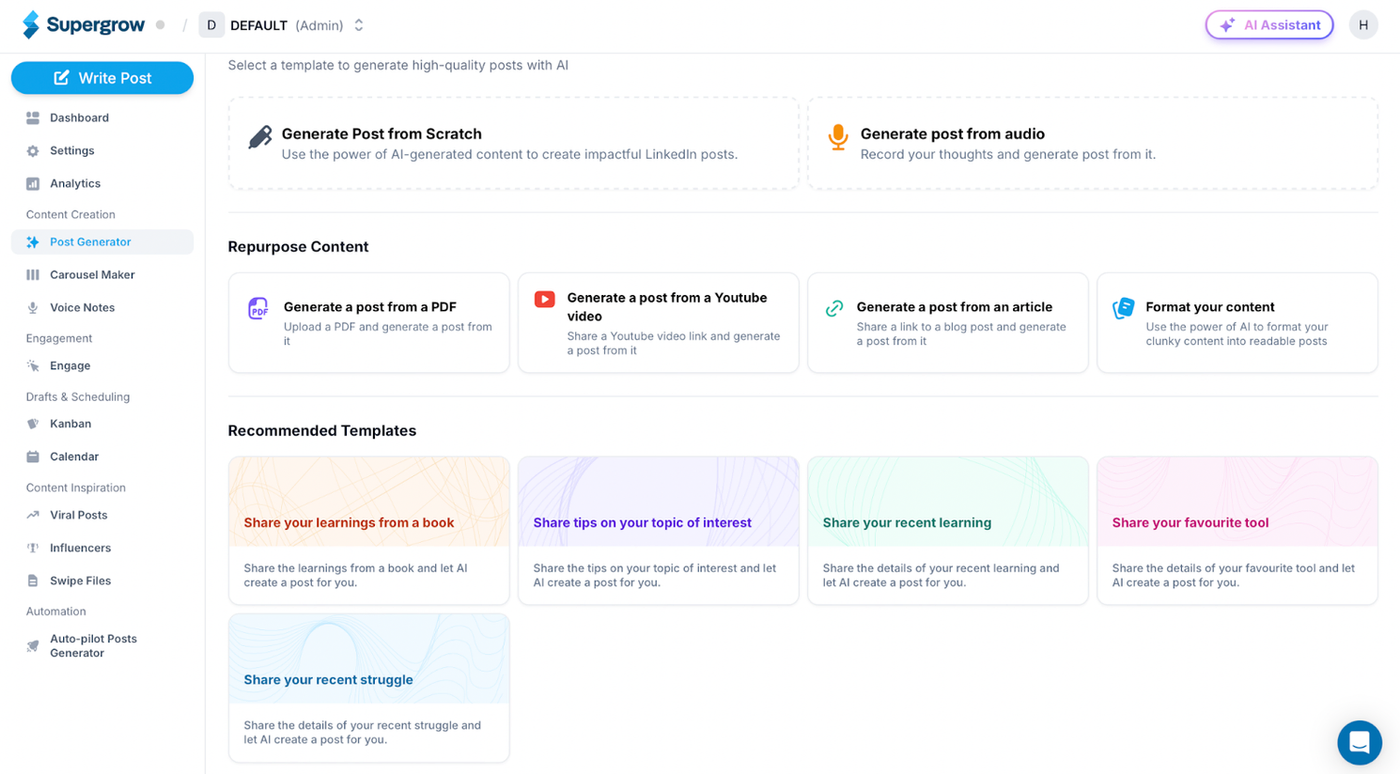
Supergrow is an AI-driven LinkedIn branding tool designed for professionals who want to stay visible without turning content creation into a full-time job.
Rather than pumping out generic AI text that screams “a robot wrote this,” it actually learns your voice from past posts to create content that sounds like you. You can repurpose blogs, YouTube videos, or PDFs into LinkedIn posts, schedule everything in advance, and handle engagement from one clean dashboard.
How marketers benefit
Growing consistently on LinkedIn is one of those things everyone knows they should do but most people abandon after a few weeks. Supergrow changes that math.
- You can turn existing content into LinkedIn posts instead of starting from scratch every time.
- The AI writes in your actual voice, so your posts don’t sound like everyone else’s generic thought leadership.
- Ready-made carousel templates and a drag-and-drop scheduler eliminate the “what should I post today” paralysis.
- The engagement dashboard helps you actually build relationships instead of just broadcasting into the void.
- Teams get the added benefit of managing multiple profiles with shared workflows, so your company’s LinkedIn presence stays coordinated instead of scattered.
Key features
| Feature | What it Means for Marketers |
|---|---|
| Custom AI Writing | Creates posts that actually sound like your voice, not generic AI copy |
| Content Repurposing | Transform existing blogs, videos, and PDFs into LinkedIn content |
| Templates | Ready-to-use carousels and post formats to speed up creation |
| Visual Scheduler | Drag-and-drop calendar for planning posts in advance |
| Swipe File Extension | Save inspiring posts directly from your browser for future ideas |
| Engagement Dashboard | Track conversations and build custom target lists for outreach |
| Team Collaboration | Manage multiple company profiles with organized workflows |
| Post Analytics | See what content actually performs at the individual post level |
Perfect for
Professionals and small teams who want to build their LinkedIn presence consistently without it taking over their entire workday.
Read: Are You Making the Most of Your LinkedIn Content Calendar?
- Statusbrew
What is it
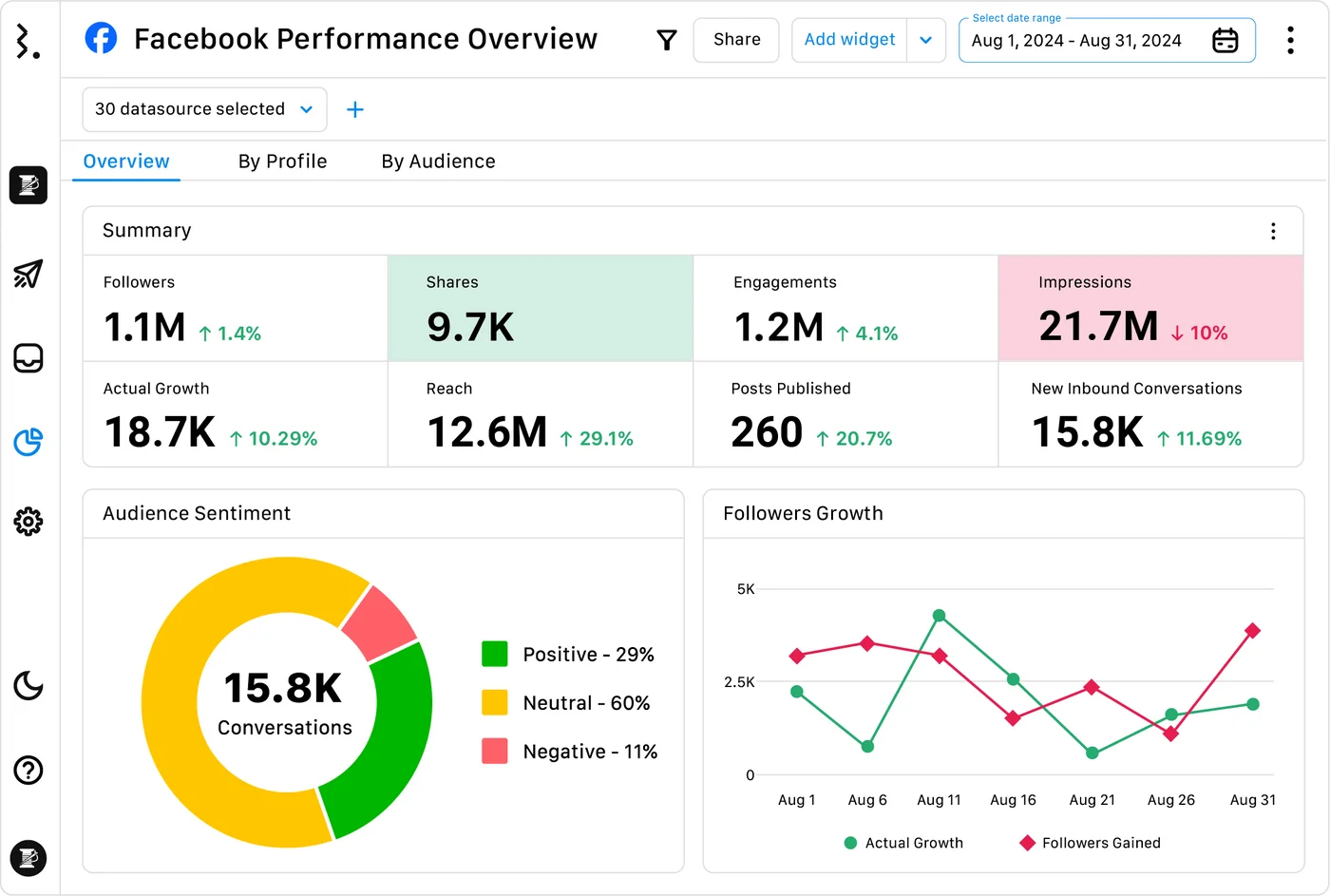
Statusbrew is a social media management platform that gives marketing teams everything they need without the enterprise-level price tag or complexity.
While it goes head-to-head with the big names in features, it’s built around collaboration and automation so teams can actually scale their social presence instead of drowning in it. Think unified scheduling, engagement, and reporting that doesn’t require a manual to figure out.
How marketers benefit
Managing multiple social accounts usually means juggling five different tools and hoping nothing falls through the cracks. Statusbrew consolidates that chaos in multiple ways, like:
- Your unified inbox collects comments, DMs, reviews, and ad messages so nothing gets missed when you’re moving fast.
- Visual campaign planning means no more spreadsheet scheduling - you can see your entire content calendar at a glance and drag things around when plans change.
- Client approval workflows let external stakeholders review content without needing platform access or learning new systems.
- With 250+ KPIs and campaign tagging, you can finally prove what’s working across all your channels instead of guessing.
- The AI moderation and bulk actions are lifesavers during busy campaign periods, and the integrations with Canva, Slack, and HubSpot mean it plays nicely with your existing stack.
Key features
| Feature | What it Means for Marketers |
|---|---|
| Visual Content Calendar | Drag-and-drop scheduling that makes campaign planning actually visual |
| Unified Inbox | All your social messages, comments, and ad interactions in one place |
| Campaign Reporting | Tag-based reports with 250+ KPIs to track what’s actually working |
| Approval Workflows | Let clients review and approve content without giving them platform access |
| AI Moderation | Automatically filter comments and manage inbox priorities |
| Team Management | Role-based access and custom views so everyone sees what they need |
| Bulk Scheduling | Upload, pause, or adjust multiple posts at once during busy periods |
| Integrations | Connects with Canva, Slack, HubSpot, Google Drive, and other tools you already use |
Perfect for
Agencies and marketing teams who need enterprise-level social media management without the enterprise budget or learning curve.
- Smart Templates for Jira
What is it
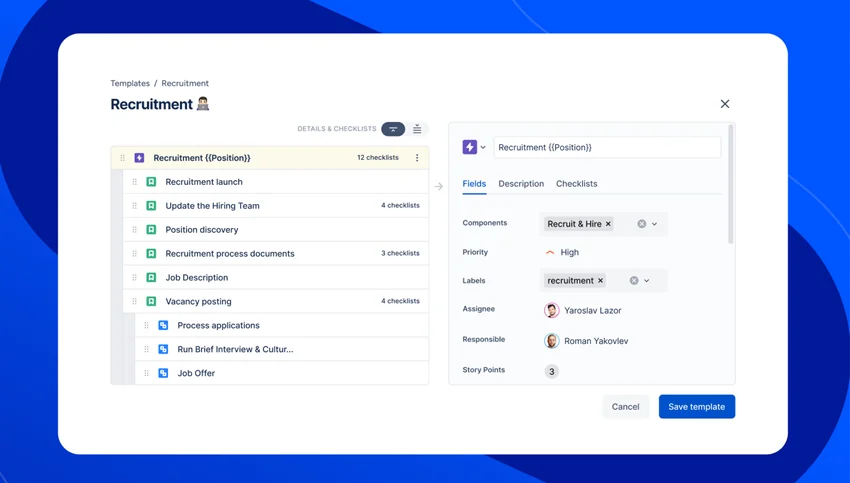
What marketers don’t know is that Jira isn’t just for engineers tracking bugs. Smart Templates for Jira, part of TitanApps’ productivity suite, transforms the platform into a proper campaign management hub for marketing, HR, and finance teams.
Instead of reinventing the wheel every time you launch a campaign, you build reusable templates that capture every step of your workflow - then deploy them with a single click whenever you need to kick off something new.
How marketers benefit
If you’ve ever found yourself copying last month’s campaign brief just to get started faster, this tool makes that process actually systematic.
- You can turn recurring tasks like email campaigns, content planning, or A/B tests into structured templates that launch instantly.
- Social media managers can set up campaign workflows with predefined tasks for content creation, design reviews, and approvals - so nothing falls through the cracks anymore.
- New team members inherit the same proven processes instead of figuring things out as they go.
- With Smart Checklist integration, you can add detailed to-do lists within templates, giving you repeatability without losing flexibility when campaigns need custom touches.
Key features
| Feature | What it Means for Marketers |
|---|---|
| Variables in Templates | Use one master template across different campaign types and clients |
| Pre-Filled Fields | Automatically standardize custom fields so your data stays consistent |
| Dynamic User Assignment | Auto-assign teammates and mention the right people in work items |
| Automated Due Dates | Calculate project deadlines without manual date math |
| Automation Integrations | Connect with Jira Automation and third-party tools you already use |
| Built-in Scheduler | Create recurring work items on a set schedule |
| Smart Checklist Integration | Add detailed task breakdowns within your templates |
Perfect for
Marketing teams who run similar campaigns repeatedly and are tired of rebuilding the same project structure every single time.
- Mailmodo
What is it
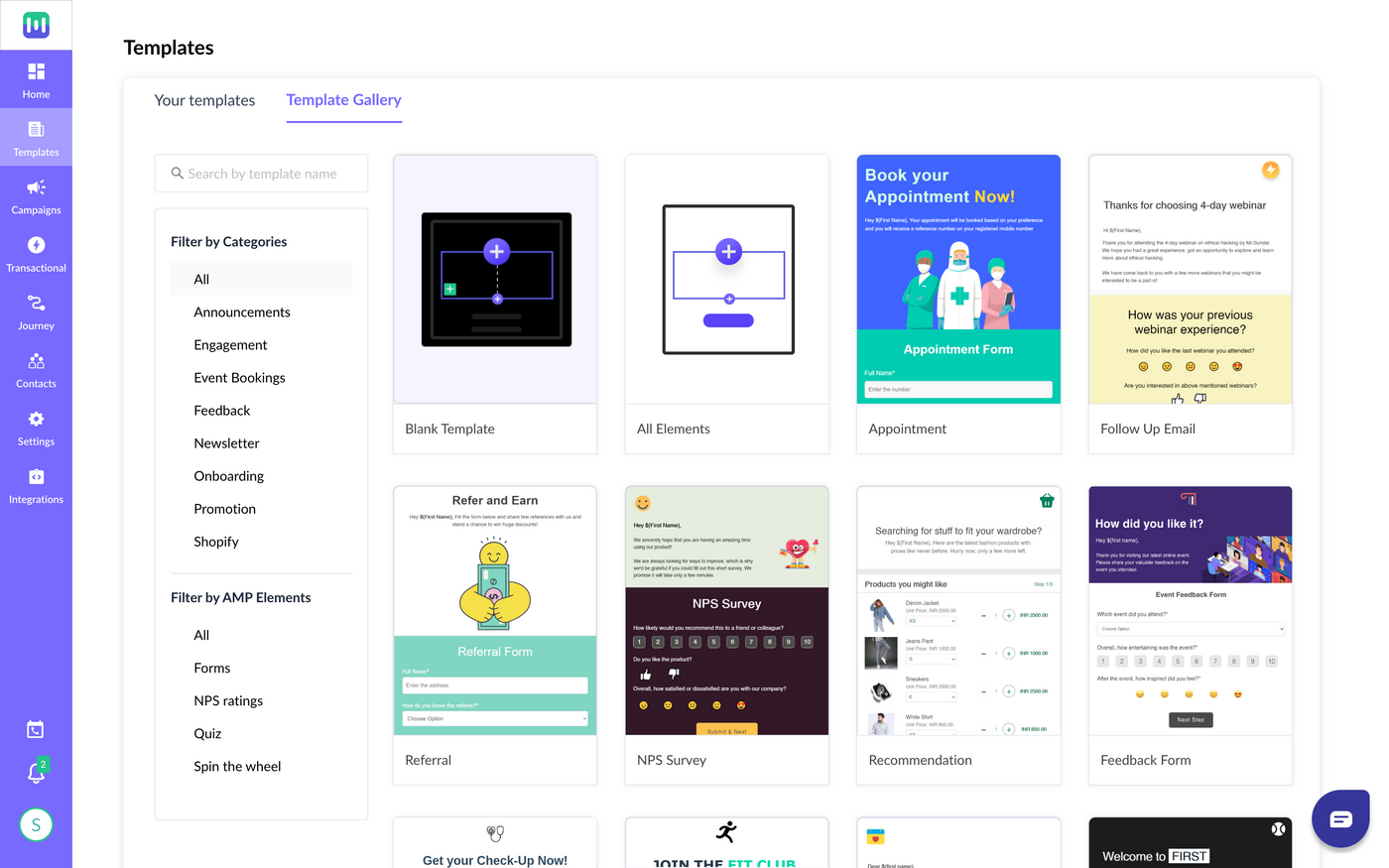
Mailmodo is an email marketing platform that turns boring static emails into interactive experiences people actually want to engage with.
Instead of sending subscribers to yet another landing page they’ll probably abandon, you can embed forms, surveys, shopping carts, and quizzes directly in the email itself. Recipients can complete actions without ever leaving their inbox - which means higher engagement and fewer drop-offs for you.
How marketers benefit
Most email platforms treat interactivity like rocket science, requiring developers or expensive agencies to make anything work. Mailmodo flips that completely.
- You can build interactive AMP emails using drag-and-drop tools without writing a single line of code.
- Recipients can fill out forms, complete surveys, or recover abandoned carts right in their inbox instead of clicking through to another page.
- Your existing CRM and marketing automation workflows stay intact as Mailmodo integrates seamlessly with tools you’re already using.
- Real-time analytics show you exactly how people interact with your emails so you can optimize what’s working.
- Whether you’re generating leads, collecting feedback, or driving e-commerce sales, your emails start feeling more like mini-apps than static messages.
Key features
| Feature | What it Means for Marketers |
|---|---|
| AMP Email Builder | Create interactive emails with drag-and-drop tools - no coding required |
| Interactive Elements | Embed working forms, quizzes, surveys, and shopping carts directly in emails |
| Automation & Personalization | Scale interactive campaigns across customer journeys with smart triggers |
| CRM Integrations | Works seamlessly with major CRM and marketing platforms you already use |
| Real-Time Analytics | Track engagement and conversions as they happen, not days later |
| No-Code Setup | Build and deploy interactive campaigns without needing technical resources |
Perfect for
Marketers who want to boost email engagement and conversions without needing developers or complicated workarounds.
Read: TikTok vs Reels vs Shorts: An Exclusive study of Measure Studio
- Mobile Text Alerts
What is it
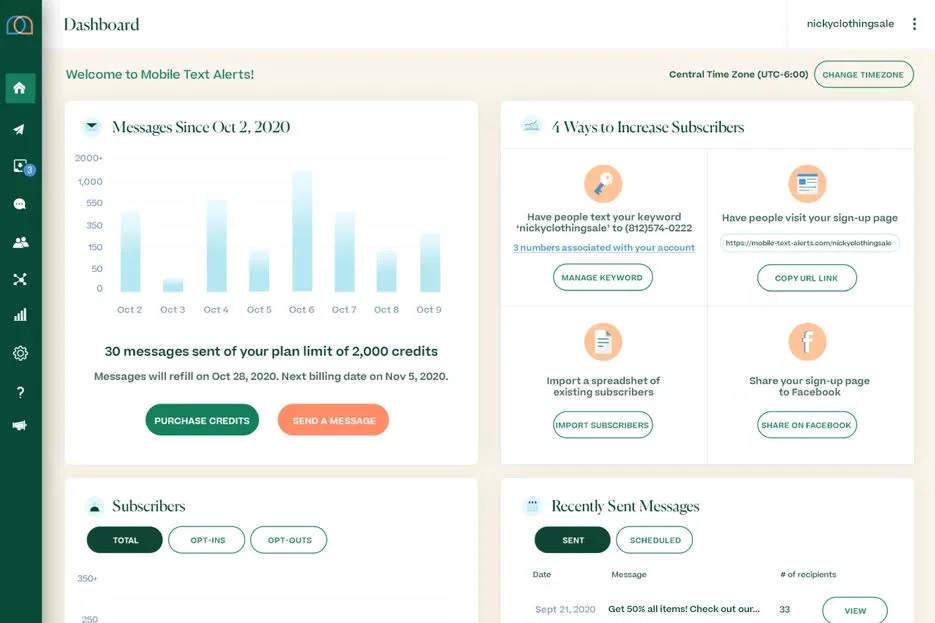
Mobile Text Alerts is a business texting platform that cuts through inbox chaos with messages people actually see and respond to.
While your carefully crafted emails compete with hundreds of other messages, text messages get noticed immediately - and this platform makes SMS marketing simple enough for small businesses but powerful enough for enterprise teams. You get bulk messaging, automation, and integrations without needing a technical degree to figure it out.
How marketers benefit
Email open rates keep declining, but text messages still get read within minutes of being sent. Mobile Text Alerts turns that advantage into results by:
- Helping you send bulk campaigns and set up automated drip sequences without wrestling with complicated workflows.
- With integrations to 5,000+ tools including HubSpot and Mailchimp, SMS fits seamlessly into your existing marketing stack.
- MMS support lets you add visuals and rich media, while two-way messaging turns broadcasts into actual conversations with customers.
- Built-in compliance tools keep you on the right side of regulations while real-time analytics show you exactly what’s working.
Key features
| Feature | What it Means for Marketers |
|---|---|
| Mass Texting | Send bulk SMS campaigns from an intuitive dashboard that anyone can use |
| SMS Automation | Set up drip campaigns, reminders, and follow-ups that run on autopilot |
| Segmentation & Personalization | Target specific audience segments with tailored messaging |
| MMS Support | Add images, GIFs, and rich media to make messages more engaging |
| Real-Time Analytics | Track opens, clicks, and conversions as they happen |
| Integrations | Connect with HubSpot, Mailchimp, Trello, and 5,000+ other tools |
| Compliance Tools | Manage opt-ins and stay compliant with SMS regulations automatically |
| Two-Way Messaging | Have real conversations with subscribers instead of just broadcasting |
Perfect for
Marketing and customer service teams who need their messages seen immediately instead of getting lost in crowded email inboxes.
- Heyou

What is it
Heyou is a LinkedIn engagement tool that transforms your entire team into active brand advocates without the awkward “please like my post” Slack messages.
Instead of hoping employees remember to engage with company content, it automatically coordinates authentic interactions with posts from your company, colleagues, customers, and partners.
The goal here is simple - consistent LinkedIn visibility that builds trust and strengthens relationships, all happening naturally in the background.
How marketers benefit
Company page posts on LinkedIn get terrible reach, but personal profiles still perform well. Heyou bridges that gap by turning your team into a coordinated engagement machine.
- Your content gets amplified within minutes of publishing instead of disappearing into the LinkedIn void.
- Customer-facing teams stay visible to prospects and clients through consistent, authentic activity that builds trust over time.
- Unlike sketchy automation tools that get accounts flagged, Heyou blends AI with human-like engagement patterns that LinkedIn actually approves of.
- Your team can support business goals on LinkedIn without manually scrolling feeds or remembering to engage with every post.
- The compliance and security framework means you can scale this across your entire company without worrying about policy violations or data breaches.
Key features
| Feature | What it Means for Marketers |
|---|---|
| Automated Engagement | Boosts visibility of company posts and important customer/prospect updates |
| Instant Amplification | Coordinates team engagement within minutes of content going live |
| Smart Targeting | Prioritizes posts and connections tied to your actual business goals |
| AI + Human Blend | Creates authentic engagement patterns that feel natural, not robotic |
| Compliance Safe | Built to align with LinkedIn’s terms of service and avoid account penalties |
| Privacy-First Design | Secure framework that protects your team’s personal and business data |
Perfect for
Marketing, sales, and customer success teams who want their entire company actively building relationships and visibility on LinkedIn without the manual coordination headache.
Read: How Influencer Tracking Lets You Measure Campaign ROI Stress-Free
What we noticed along the way
After looking at these tools and talking to the teams using them, a few patterns started jumping out.
Not every tool works for every team, some solve surprisingly similar problems in different ways, and there are definitely things to keep in mind when you’re building your stack.
Here’s what stood out:
- AI is everywhere, but the approach matters
Almost every tool on this list uses AI differently - Demand Genius audits content, Octolens filters noise, Supergrow writes in your voice, and Heyou blends AI with human-like engagement.
The winners aren’t just slapping “AI-powered” on generic features. They’re using it to solve specific problems that would otherwise require hours of manual work.
- Platform-specific beats “All-in-one” for most teams
Rather than trying to be everything to everyone, tools like Supergrow (LinkedIn), Mailmodo (email), and Smart Templates (Jira) go deep on one platform.
Teams told us they’d rather have tools that excel in specific areas than mediocre coverage across everything.
- AI can see things humans miss - and the gap costs you reach
Most tools use AI to automate tasks, but some reveal why your content fails in the first place. Measure Studio’s Post Content AI once flagged salon images of wet hair as “dogs,” which tanked impressions by sending them to pet lovers.
Funny, but also proof that the gap between human perception and algorithmic reality can derail results and quietly tank performance for months. The right one helps you avoid those kind of mistakes.
- Integration density is the real differentiator
Mobile Text Alerts connects with 5,000+ tools, Statusbrew plays nicely with your existing design and CRM stack, and Smart Templates works within Jira instead of fighting it.
The tools teams actually stick with are the ones that fit into workflows instead of forcing new ones.
- Everyone’s trying to solve the “Noise” problem
Whether it’s Octolens filtering social mentions, Demand Genius cutting through content chaos, or Mobile Text Alerts bypassing crowded email inboxes, the best tools help you focus on what actually matters instead of drowning in data.
What all of this research really revealed is that the teams who build effective stacks think differently about tools from the start.
Read: Can Your Social Media Dashboard Predict the Lifecycle of Your Content?
For marketers done with tool hopping
After all these conversations, the pattern is clear: marketers who picked tools based on specific problems they needed to solve were happier six months later than those who picked based on feature lists.
So here’s the move - pick one and start there. Because often, the difference between good and bad tool decisions isn’t the tool itself, it’s whether your team will actually use it or if it’ll be collecting dust on your subscription list.
That’s the thinking behind Measure Studio too; helping marketers focus on clarity instead of juggling dashboards. If you want to try it for yourself, go for it.
Get started with Measure Studio today.
Author Bio

I’m Bhakti Chadhaa, a content strategist and long-form writer who brings structure, voice, and narrative clarity to commercial writing. After building a multi-industry portfolio across B2B, D2C, and SaaS, I now specialize in founder-led content that clarifies positioning, deepens narrative, and drives visibility through blogs, LinkedIn, or long-form guides. If you’re looking to collaborate on content strategy, writing, or editorial management, my LinkedIn is always open.
Frequently Asked Questions
What features should I look for in a marketing tool?
The best tool for you depends on how it connects to your stack, automating the boring tasks, and giving insights you can actually use. Focus less on “everything it can do” and more on “what will actually make my workday easier.”
How do AI-powered marketing tools save time for teams?
The best AI-powered tools free up hours by:
- Automating reports and audits
- Surfacing insights instead of raw data
- Personalizing with speed and at scale
How can I measure the ROI of my marketing tools?
Think in outcomes, not outputs. Some practical ways to measure:
- Did performance improve with less effort?
- Can you connect activity (emails, campaigns) to revenue in your CRM?
- Are costs lower or time savings higher than before?
If the answer is “yes” on at least two, that’s ROI.
Should I choose an all-in-one marketing platform or specialized tools?
Both approaches have pros and cons:
- All-in-one platforms are easier to setup, give unified reporting, but often shallow.
- Specialized tools go deep on one problem and offer better results but mean managing more logins and integrations.
Most teams mix both - one core platform plus a few focused tools where it really matters.
How do I decide between free and paid marketing tools?
Start by asking what you really need the tool for:
- If you’re just testing or managing a small team, a free plan can be enough to experiment and see if it fits.
- If you need advanced automation, integrations, or reporting, paid tiers are usually unavoidable.
A good rule is to try for free, validate usefulness, and upgrade only if the ROI is clear.